Interviews
Interviews help your team evaluate candidates through scheduled conversations, AI-assisted meetings, and recorded interview workflows. Use the Interviews page to search interviews, track status, switch between list and calendar views, schedule new interviews, and open interview records.
What you can do here:
- Search scheduled and historical interviews.
- Filter interviews by status.
- View interviews in a table or calendar.
- Schedule interviews for candidates attached to a job.
- Track date, time, duration, timezone, and interviewer details.
- Open interview details to review candidate, job, transcript, remarks, and recording.
- Reschedule or cancel interviews when needed.
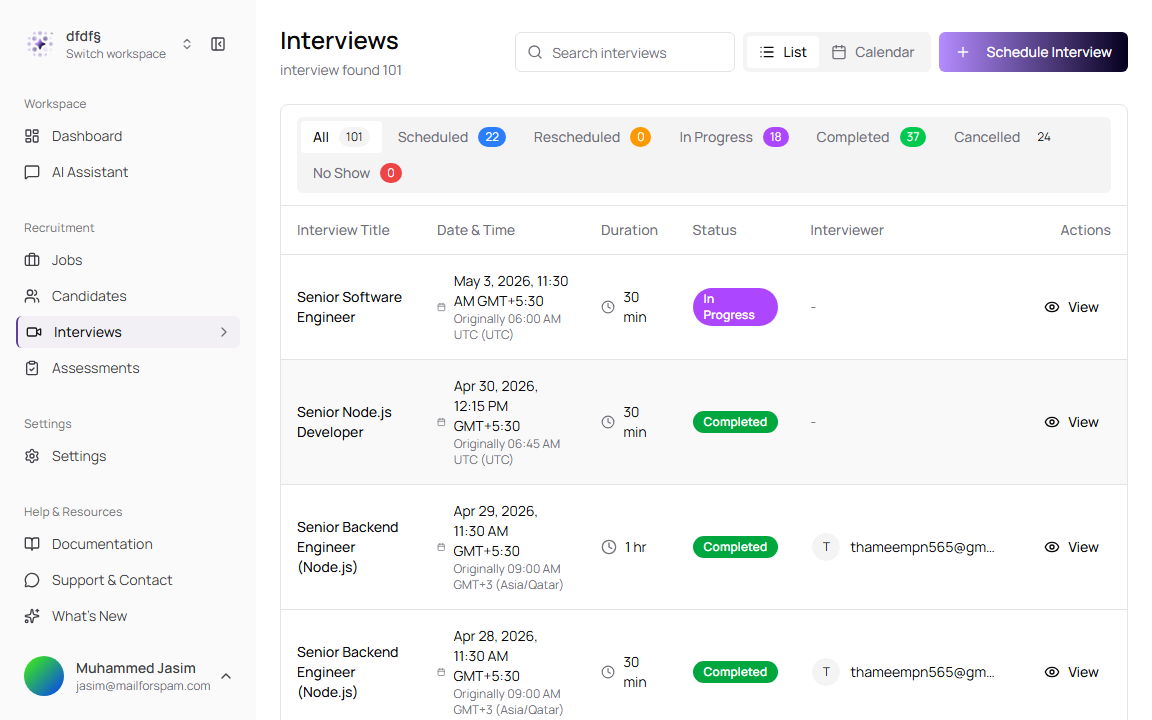
View Interviews
The list view shows scheduled and completed interviews in a table. Use it when you need to find an interview quickly, check status, or open the interview details page.
- Go to Interviews from the sidebar.
- Use Search interviews to find a specific interview.
- Use List or Calendar to change the view.
- Use the status tabs to filter interviews.
- Select the interview title or View to open the interview details page.
Page Controls
| Control | Description |
|---|---|
| Search interviews | Filters the interview list. |
| List | Shows interviews in a table with date, time, duration, status, and interviewer. |
| Calendar | Shows interviews on a monthly calendar. |
| Schedule Interview | Opens the interview scheduling workflow. |
| All | Shows all interviews. |
| Scheduled | Shows interviews waiting to happen. |
| Rescheduled | Shows interviews that were moved to a new time. |
| In Progress | Shows interviews currently underway. |
| Completed | Shows finished interviews. |
| Cancelled | Shows cancelled interviews. |
| No Show | Shows interviews where the candidate or interviewer did not attend. |
List Fields
| Field | Description | Required |
|---|---|---|
| Interview Title | Usually the job title connected to the interview. Select it to open interview details. | Yes |
| Date & Time | Scheduled time in your local timezone. If the stored timezone differs, TruePick also shows the original scheduled time and timezone. | Yes |
| Duration | Interview length, such as 30 min or 1 hr. | Yes |
| Status | Current interview state. | Yes |
| Interviewer | Primary interviewer email when assigned. | No |
| Actions | Includes View to open the interview record. | No |
Use Calendar View
Use Calendar when you want to see interview load across days instead of reading a table.
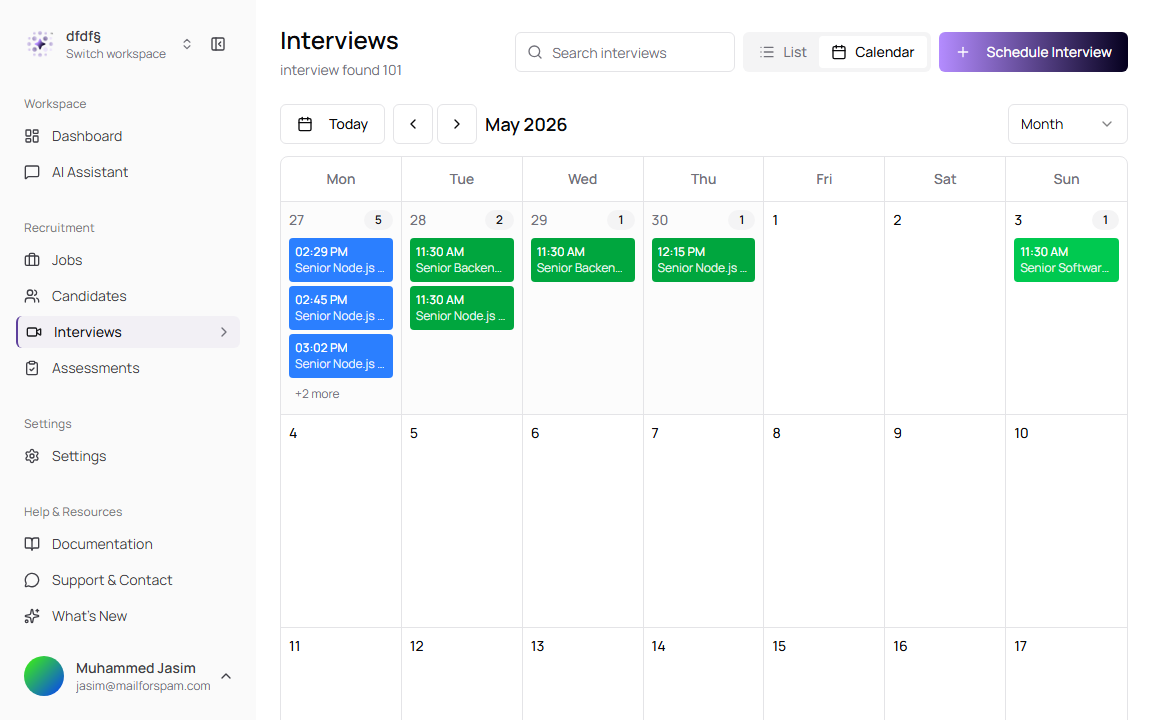
| Control | Description |
|---|---|
| Today | Jumps the calendar back to the current date. |
| Month navigation | Moves between calendar months. |
| Month | Shows the current calendar mode. |
| Interview item | Shows the interview time and title on the scheduled day. |
| + more | Indicates that more interviews are scheduled on that day than can fit in the cell. |
Schedule an Interview
Use Schedule Interview to create a new interview for a candidate already connected to a job.
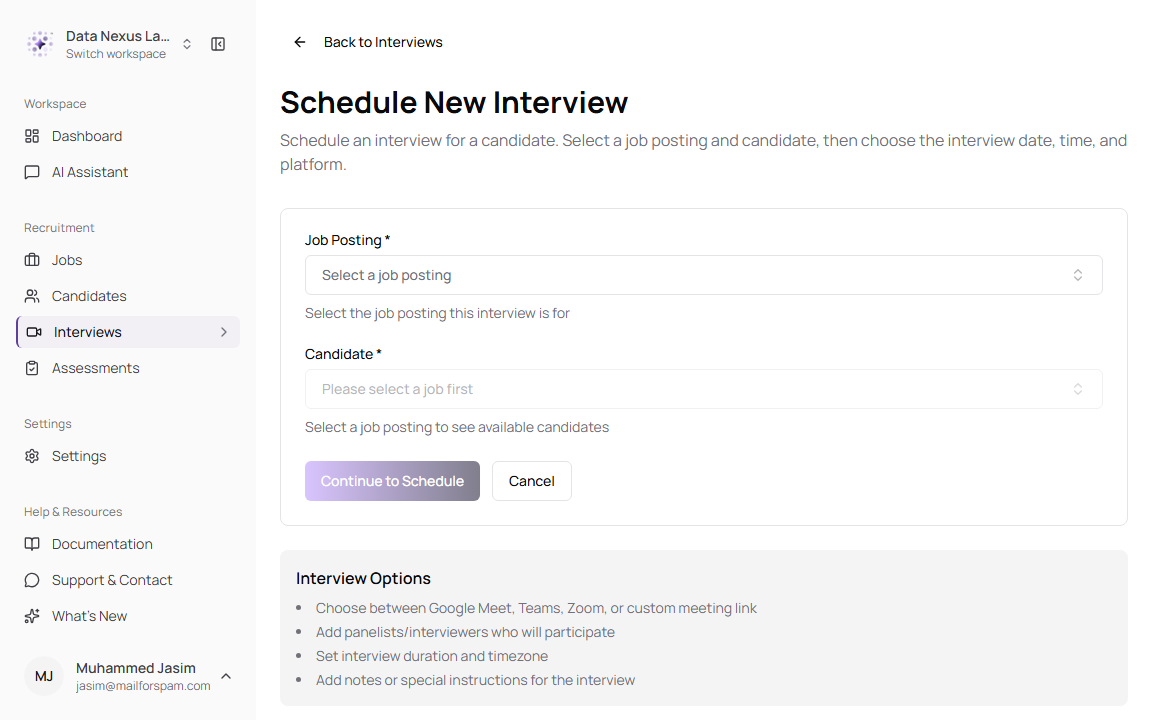
- Go to Interviews.
- Click Schedule Interview.
- Select a Job Posting.
- Select a Candidate for that job.
- Click Continue to Schedule.
- Set the date, time, duration, timezone, interviewer emails, meeting platform, and notes.
- Click Schedule Interview.
Initial Selection Fields
| Field | Description | Required |
|---|---|---|
| Job Posting | Selects the job the interview is for. The candidate list depends on this selection. | Yes |
| Candidate | Selects the candidate to interview. This is disabled until a job posting is selected. | Yes |
| Continue to Schedule | Moves to the detailed scheduling form after job and candidate are selected. | Yes |
| Cancel | Leaves the scheduling workflow without creating an interview. | No |
Schedule Details Fields
| Field | Description | Required |
|---|---|---|
| Date | Interview date. Past dates are not allowed. | Yes |
| Time | Interview start time in the selected timezone. | Yes |
| Duration | Interview length. Available presets come from interview settings, commonly 30, 45, 60, or 90 minutes. | Yes |
| Time Zone | Timezone used to store the interview time. TruePick displays local and original timezone information where needed. | Yes |
| AI Meeting Assistant | When enabled, an AI assistant can join the meeting to transcribe, analyze, and summarize the interview. | No |
| Interviewer Emails | One or more interviewer email addresses. Each interviewer receives an invitation. | Yes |
| Meeting Platform | Selects Google Meet, Microsoft Teams, Zoom, or In-Person / Phone. | No |
| Meeting Link | Virtual meeting URL. You can enter it manually or generate one when the platform is connected. | No |
| Location | Appears for In-Person / Phone interviews. Use it for office address, phone number, or contact method. | No |
| Notes | Additional instructions or context for the interview. | No |
If meeting link generation is unavailable, enter the meeting link manually or connect the platform from Settings > Connections.
Review Interview Details
Open an interview record when you need to see candidate information, job context, schedule details, recordings, transcripts, or remarks.
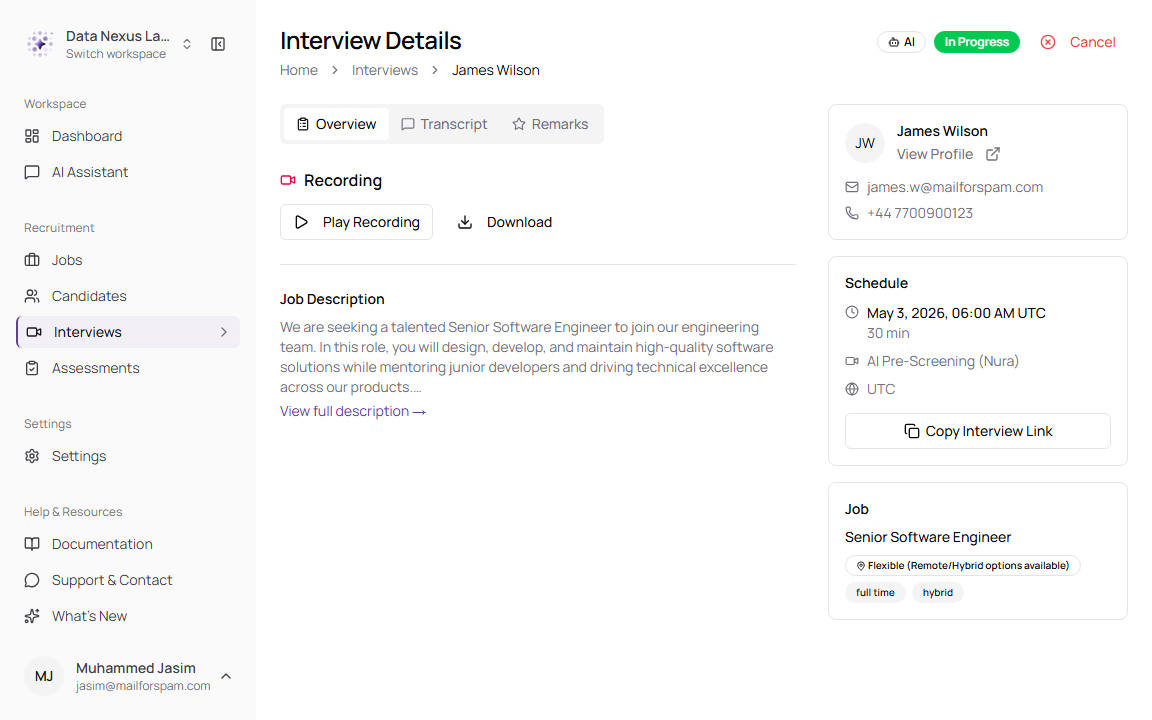
Detail Tabs and Areas
| Area | Description |
|---|---|
| Overview | Shows job description, candidate summary, schedule details, and job information. |
| Transcript | Shows the conversation transcript when available. |
| Remarks | Stores recruiter or interviewer feedback. |
| Recording | Shows recording playback and download controls when a recording exists. |
| Candidate Information | Shows candidate name, profile link, email, and phone number. |
| Schedule | Shows scheduled date/time, duration, platform, and timezone. |
| Job | Shows the connected job title, location, and job attributes. |
Interview Actions
| Action | Description |
|---|---|
| Start Interview | Starts an interview when available for the current status and workflow. |
| Reschedule Interview | Updates the interview time, meeting link, or notes and notifies participants. |
| Cancel Interview | Cancels the interview. You can add a cancellation reason. |
| Copy Interview Link | Copies the interview link when the interview has a candidate-facing link. |
| Play Recording | Plays the recording when available. |
| Download | Downloads the recording when available. |
The AI Meeting Assistant can help create transcripts and summaries, but interviewers should still review recordings, transcript quality, and remarks before making hiring decisions.